
Your query exercise was to take this Stack Overflow query to find the top-voted questions for any given tag:
|
1 2 3 4 5 |
select * from posts where tags like '%<postgresql>%' order by score desc limit 100; |
That’s currently using this index in its execution plan:
|
1 |
CREATE INDEX posts_score_tags ON posts(score, tags); |

It runs quickly, but answer 3 questions:
- What kinds of tags will perform worse than others for this query?
- Could you change the query to perform better?
- Could you change the indexes to perform better, without changing the table structure?
Q1: What tags will have problems?
The current execution plan is scanning the posts_score_tags index backwards, from highest-scoring posts down. As soon as it finds 100 posts that match the tag we’re looking for, boom, the query can stop scanning.
That works really well for common tags like postgresql, but the rarer of a tag we’re looking for, the slower the query is going to get. It takes longer to scan through the entire table, hoping to find 100 rows that match, checking the contents of each Tags.
For example, let’s look for a relatively recent tag, postgresql-16:
|
1 2 3 4 5 |
select * from posts where tags like '%<postgresql-16>%' order by score desc limit 100; |
The postgresql-16 plan is the same as searching for postgres, but because there weren’t even 100 postgres-16 questions yet, the query takes hours to run. It scans the entire index start to finish, looking for the “first” 100 questions, and never finds 100. Ouch!

That’s 4 hours, 16 minutes. Yowza.
The less data there is for a tag, the longer the query will take to run. So the answer here is that rare tags will have problems. (Isn’t that wild? Usually we think of ‘big data’ as being more problematic for query performance, but here it’s the opposite problem.)
Q2: Could we improve the query?
Database admins often have a knee-jerk reaction to seeing “SELECT *” and they scream that it’s bad for performance. We could modify the query so that it returns less columns, and let’s try an extreme example of that. Let’s only return in columns included in our posts_score_tags index:
|
1 2 3 4 5 |
select score, tags from posts where tags like '%<postgresql>%' order by score desc limit 100; |
Our plan has just an index-only scan, and runs in milliseconds:

Like the screenshot mentions, the index-only scan means that it only does a single read operation – just from the index – not the underlying heap. Sure, that’s an improvement, but…
When we switch to the postgresql-16 tag that runs slowly, we’re still screwed. It still scans the whole index and takes hours. The problem wasn’t the one extra read per row of going back to the corresponding table. The problem is scanning the whole index to begin with.
So I would argue that:
- For common tags, people aren’t concerned with performance because the query’s already fast enough
- For uncommon tags, where performance is terrible, query changes don’t help
There’s one way to cheat: add additional filters in the query. If you’re only interested in top-scoring questions, maybe that means you’re not interested in very low-scoring questions. There are a lot of low-scoring questions since all questions start with 0 upvotes:
|
1 2 3 4 5 |
select score, SUM(1) as recs from posts p where score < 10 group by score order by score; |
And it turns out there are an awful lot of questions and answers that even get downvoted lower than 0!

We can avoid reading those if we change our query to add a filter on minimum score:
|
1 2 3 4 5 6 |
select * from posts where tags like '%<postgresql-16>%' and score > 10 order by score desc limit 100; |
But even with that, the postgresql-16 tag still takes ~24 seconds to run (plan). If performance is a feature for our site, we’re still gonna need a better solution – but I still feel like I should mention that possible solution here because it often works in real life. I’m often able to say, “Wait, isn’t there another column here we could filter on, and add that to the index? Are we really interested in sales from 1982?”
Q3: Could we tune indexes without changing the table structure?
I have to put in the second half of that sentence because I wanted to keep the challenge realistic to short-term real-world work. In the real world, we’re not usually allowed to point, shriek, and demand application code changes.
Let’s start by looking at the table screenshot from the challenge blog post:

We might try full text indexing, but we’ve got our work cut out due to those wacko tags like c++builder-xe2. Go through the database or Stack Overflow’s tag list to see plenty of other non-word-type examples, like .a, .net-4.6.2, 2048, and so on.
For example, row 54 in that screenshot has tags = ‘<ide><c++builder><scintilla><c++builder-xe2>’. Let’s use the built-in ts_parse to see what Postgres’s full text default parser would see in that string:
|
1 |
SELECT * FROM ts_parse('default', '<ide><c++builder><scintilla><c++builder-xe2>'); |
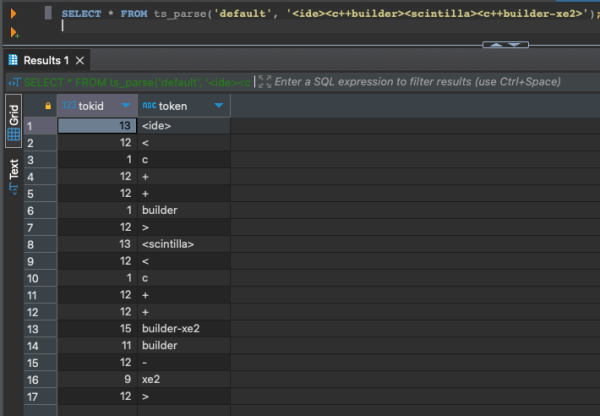
Ouch. The parser is breaking tags like “c++builder-xe2” into multiple words instead of keeping it together. You can create your own parser, but that is left as an exercise for the reader. Someone out there is going to say, “Well, you could redo the list of tags to make them alphanumeric,” but remember we’re focusing on a fast performance improvement here, not re-architecting the table.
Another full text option is trigram searches with the pg_trgm extension. After installing that extension, we’ll use its parser to see how it breaks up the problematic tag:
|
1 |
SELECT show_trgm('<ide><c++builder><scintilla><c++builder-xe2>'); |
The results, with the words wrapped:
|
1 2 |
{" b"," c"," i"," s"," x"," bu"," c "," id"," sc"," xe",bui,cin,"de ", der,"e2 ","er ",ide,ild,ill,int,"la ",lde,lla,nti,sci,til,uil,xe2} |
That seems problematic because we lost the c++, for example, but have faith, and build a trigram index:
|
1 |
CREATE INDEX posts_tags_gin ON posts USING gin (tags gin_trgm_ops); |
And without changing the query:
|
1 2 3 4 5 |
select * from posts where tags like '%<postgresql-16>%' order by score desc limit 100; |
Postgres uses it, as shown in the actual execution plan:

And we’re talking milliseconds rather than seconds – or even worse, minutes that it used to take for rare tags!
Although… now, if we run it for common tags, we have the opposite problem. Common tags like <postgres> return a lot more rows, so their queries take seconds.
- Postgres tag: before, milliseconds. Now, seconds.
- Postgres-16 tag: before, hours. Now, milliseconds.
That compromise might be good enough for the business. For more about trigram indexes to solve this kind of problem, check out this Microsoft blog post.
Just for the sake of exploration, we’ll drop the trigram index and continue our research. Is there another way we can reduce the query’s search space? Let’s look at the list of Posts again:

If you look at the screenshot with your special eyes, you’ll see your brand some rows don’t have tags at all. However, our index on score_tags includes all rows of the table, whether they have null or populated tags.
Let’s see how much of the table has null tags:
|
1 2 3 |
select sum(1) as rows, sum(case when tags is null then 1 else 0 end) from posts; |
The table has about 60 million rows, of which 35.5 million have null tags. More than half of the table’s rows can’t possibly match our search. Wouldn’t it be cool if we could remove those from the index? Indeed, we can, with a partial index.
|
1 2 |
CREATE INDEX posts_score_tags_partial ON posts(score, tags) WHERE tags IS NOT NULL; |
Now, if we look for a rare tag, the query plan can avoid scanning those rows with null tags, and that query plan uses our newly created partial index automatically.
But… it’s still hella slow. A web app with a 30-second timeout still isn’t going to be able to get that query to run to completion, so that’s not really good enough.
So the winner in our experiments: trigram indexes. In what we’ve done so far, it makes searching for rare tags really fast, but it does have the drawback of making common tag searches slower. But what if the business wants everything to be equally fast? What if, like Stack Overflow used to say, “Performance is a feature”?
Sometimes, we gotta change the database.
When tables are small, table design is less critical. As your application grows over time:
- There are more users, running more queries, simultaneously
- The size of the data they’re querying grows, so each query becomes more resource-intensive
- The distribution of data changes, and you’re more likely to have outliers with unique performance challenges
- The shortcuts and mistakes from the application’s beginning come back to haunt you
In this case, the problem is the bad design of the Tags column, putting 5 different complex strings in a single string column. So let’s say we’re willing to bite the bullet and put in the work necessary to change it.
So that’s your next Query Exercise. If you were willing to make schema changes, how might you make all of the searches fast? Keep in mind that:
- We have a lot of existing code that uses the Posts.Tags column
- That code does selects, inserts, and updates
- We want our changes to be backwards-compatible: old code still has to work
- We need to give developers an option for slow queries, letting them change those slow queries to get faster performance if they want it
That’s your challenge for this week! Post your answers in the comments, discuss the ideas of others, and we’ll check back next week with another post with the thoughts and my own solution. Have fun!