
Your Query Exercise was to find foreign key problems: data that might stop us from successfully implementing foreign keys in the Stack Overflow database.
Question 1: Write queries to find the problematic data.
Wide-awake users who keep up with our weekly news & techniques posts might have noticed that we recently linked to Francesco Tisiot’s techniques for existence checking. This week’s query challenge is not a coincidence – it was directly inspired by Francesco’s post.
Let’s tackle just one of the foreign key candidates, the relationship between posts.owneruserid and users.id, and look for owneruserids that aren’t present in users.id:
|
1 2 3 4 5 6 |
/* Not exists */ select p.id, p.creationdate, p.deletiondate, p.title, p.score, p.body, p.owneruserid, p.ownerdisplayname from posts p where p.id < 100000 and not exists (select * from users u where u.id = p.owneruserid) order by p.id; |
It returns 2,512 rows. Let’s look at the owneruserid data for those rows:

The owneruserids for this data happen to be null.
Now, is that a foreign key problem? It depends on what your goal is with implementing foreign keys. If your goal is to ensure that the data between tables has a valid relationship, then yes, this is a problem, because we don’t know who owns these posts. Postgres can absolutely still implement foreign keys with non-matching data like this, but if your goal was to keep the data “clean”, then foreign keys don’t really achieve anything here.
Another common foreign key problem would be numbers in the owneruserid column that don’t actually match up to valid rows in the users.id list. That actually does happen in other relationships in the Stack Overflow database if you do further experiments, but we’ll keep this one simple for the sake of this post.
Back to the challenge at hand – writing queries to find the data validity problems. I used not exists, but there are plenty of other ways to crack that nut:
|
1 2 3 4 5 6 7 8 9 10 11 12 13 14 15 16 17 18 19 20 21 22 23 24 25 |
/* Not exists */ select p.id, p.creationdate, p.deletiondate, p.title, p.score, p.body, p.owneruserid, p.ownerdisplayname from posts p where p.id < 100000 and not exists (select * from users u where u.id = p.owneruserid) order by p.id; /* Not in */ select p.id, p.creationdate, p.deletiondate, p.title, p.score, p.body, p.owneruserid, p.ownerdisplayname from posts p where p.id < 100000 and p.owneruserid not in (select id from users u) order by p.id; /* Left outer join */ select p.id, p.creationdate, p.deletiondate, p.title, p.score, p.body, p.owneruserid, p.ownerdisplayname from posts p left outer join users u on p.owneruserid = u.id where p.id < 100000 and u.id is null order by p.id; |
The 3 plans they produce all return pretty quickly for this limited data size:
- Not exists – 117ms, 2512 rows returned
- Not in – 143ms, 0 rows returned
- Left outer join – 151ms, 2512 rows returned
But that’s because your homework was to focus on the first 100K rows only. If we take away the where clause filtering for p.id < 100000, the queries take minutes to run, and more differences start to pop up. When you’re solving this kind of problem in the real world, if you need to tackle lots of potential foreign key issues on lots of tables, you’ll either want to offload this research work onto a development server to avoid causing performance issues in production, OR you’ll want to performance tune the bejeezus out of your discovery queries, because you won’t want to run them twice.
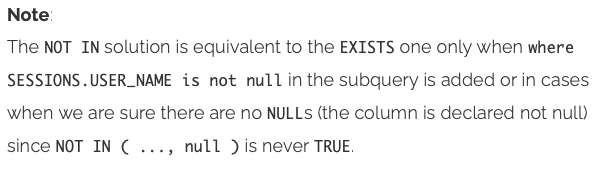
Back to the 0 rows returned thing: why are the queries returning different results? Remember that when we first looked at the data, we saw null owneruserids:
But when we used the NOT IN technique, no rows were returned. (You’ll get similar 0 results if you use EXCEPT to solve this problem.) This is an important section in Francesco Tisiot’s techniques for existence checking, and let’s pull the specific quote:
Really can’t recommend Francesco’s post enough. It’s phenomenal.
So, now we know we have foreign key problems for at least this one column, and we can repeat the process for the other columns:
|
1 2 3 4 5 6 7 8 9 10 11 12 13 14 15 |
/* comments with invalid userids */ select c.* from comments c left outer join users u on c.userid = u.id where c.id < 100000 and u.id is null order by c.id; /* comments with invalid postids */ select c.* from comments c left outer join posts p on c.postid = p.id where c.id < 100000 and p.id is null order by c.id; |
The first one has problems, but we’re lucky in the second one! The second one doesn’t have any problems in the early ids of the table. (If you remove the filter on c.id < 100000, though, the query takes minutes to run, and eventually returns 77 rows with non-null, but invalid, userids – so we’re gonna have to fix that too if we put in foreign keys.)
Question 2: What might have caused these data problems?
Let’s examine the posts rows that don’t have matching users rows.
|
1 2 3 4 5 6 |
select p.id, p.creationdate, p.deletiondate, p.title, p.score, p.body, p.owneruserid, p.ownerdisplayname from posts p left outer join users u on p.owneruserid = u.id where p.id < 100000 and u.id is null order by p.id; |
You can click on this to zoom in if you like:

We’re trying to join over to the users table using the owneruserid column, but those values are null for these rows! Ouch – obviously we’re not going to be able to do a join on a null value.
What are some reasons that a post might not have a valid owneruserid?
- Perhaps users are allowed to delete their accounts, but Stack Overflow has chosen to keep their questions & answers around for posterity.
- Perhaps there were bugs in transaction handling code. Perhaps there was a single stored procedure that was supposed to add a user and add their first post, but something went wrong, and only the post got inserted.
- Perhaps there was database corruption.
- Perhaps someone ran a delete on the users table with an incorrect where clause. (C’mon, we’ve all been there.)
- Or multiple of the above, especially for an app that’s been around for 15+ years.
I’ve seen all of these in various systems over time, but given what I know from Stack (I used to work with ’em), the first option is the likely cause for most (but not all) of the problematic rows we’re seeing here.
Pull up the site to see how it’s handling the data problem.
Normally, when you’re looking at a question or answer on StackOverflow.com, you see the person who wrote it. Let’s take a look at what the web site shows for this post.
One of the things I love about StackOverflow.com is their URL handling. If you know a row’s id, you can pull it up on the site. We’re in the posts table, which is where questions & answers are stored, and let’s say we wanna see id 34, the one about “How to unload a ByteArray”. To see posts.id = 34, put this into your browser’s address bar:
https://stackoverflow.com/questions/34/
Click that, and Stack magically redirects you to:
https://stackoverflow.com/questions/34/how-to-unload-a-bytearray-using-actionscript-3
Isn’t that cool? It works for both questions & answers, too. For example, to see posts.id 18:
https://stackoverflow.com/questions/18/
Which redirects you to:
https://stackoverflow.com/questions/17/binary-data-in-mysql/18#18
Because posts.id 18 is actually an answer for question 17. More about that join structure some other day – for now, let’s go back to the problem at hand, and we’ll look at posts.id 34 about unloading a byte array.
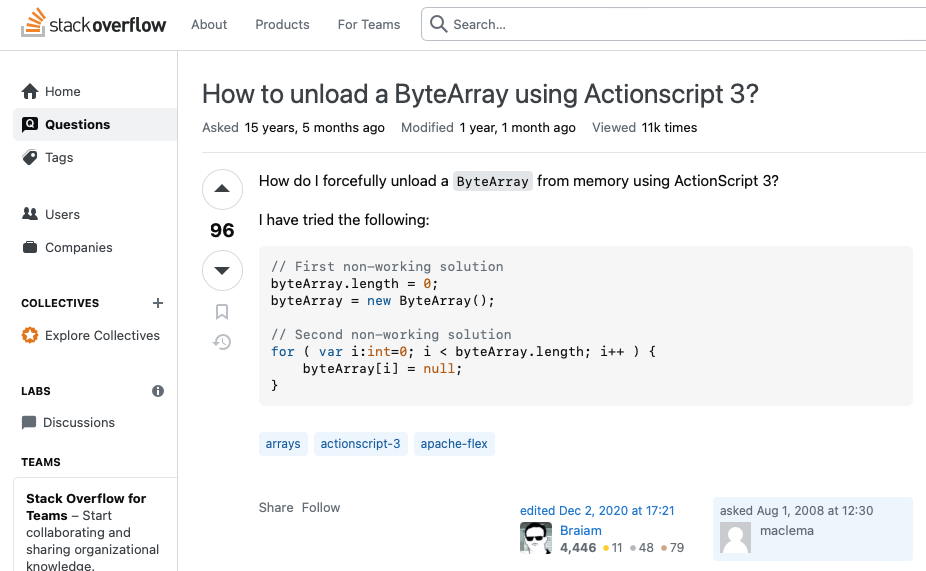
At the bottom right, Stack shows who asked the question. It says “asked Aug 1, 2008 at 12:30, maclema.”
Wait – how does Stack know the user’s name?
How are they getting the name ‘maclema’ if there’s no working join over to the users table? Let’s take another look at the data in the posts table:
And look over at the far right column:

Ah-ha! It looks like Stack de-normalized the data a little. Perhaps, when a user deletes their account, Stack goes through all of the posts with their owneruserid, and sets the ownerdisplayname value for historical purposes. Then, they can set the posts.owneruserid to null, and delete the users row.
Just for curiosity’s sake, let’s look at a few posts rows where the owneruserid is NOT null:

It kinda matches our hypothesis: they might not be populating the ownerdisplayname column until a user deletes their row. Some of the rows do have an ownerdisplayname populated though. This lines up with my real-world experience with decade-old production databases: the data is all over the place, in varying levels of explanations and quality. Perhaps Stack’s handling of deleted user accounts changed over time, too.
Question #3: any changes we want to make?
The last part of your query exercise was to think about any changes you might want to make to the app, processes, or database.
I’ll be honest with you, dear reader: I laid that as a trap for professional database administrators. When a DBA sees a database without foreign key referential integrity implemented, their first knee-jerk reaction is usually, “WE HAVE TO PUT IN FOREIGN KEYS RITE NAO TO FIX THIS PROBLEM!!1!!ONE!”
I agree with that in the beginning of an application’s lifecycle, but now that we’ve got a 15-year-old database with a ton of data that violates foreign key constraints, what are we supposed to do?
Could/should we add a hard-coded “Unknown User” row, and link the data to that? You’ll often see this with a “magic number” users row with an id of, say, 0 or -1. If we take that approach, we also have to modify our users-deletion process to assign posts.owneruserid to that magic value, or we have to implement triggers on tables to do that work. There are performance and concurrency issues associated with putting that work on the database tier, though.
Could/should we set columns to null? If a user or post is deleted, should we set all the referring columns to be null? And what should do that work, the app or a trigger? Foreign keys could be implemented in that case, but… our reports might not produce the data we expect if we’re doing inner joins. (Inner joins would work with the magic number approach above.)
Could we delete the data that doesn’t have valid relationships? If we did that, we would lose questions & answers on the site, stuff that’s valuable and helpful to looking for solutions. The business might be okay with that, though – that’s a business question, not a data professional’s question.
How’d you do? What’d you think?
I hope you had fun, enjoyed this exercise, and learned a little something. If you’ve got comments or questions, hit the comment section below.